
Delve into the world of customer experience enhancement through tailored HubSpot workflows, where businesses can revolutionize interactions and engagement.
Learn about the process of creating personalized workflows, delivering targeted messages, and measuring success to optimize the customer journey.
Introduction to Custom HubSpot Workflows
HubSpot workflows are automated sequences of actions that can be customized to engage customers at different stages of their journey. These workflows are designed to streamline processes, nurture leads, and enhance overall customer experience.
Custom workflows play a crucial role in improving customer interactions by delivering personalized content, timely responses, and targeted communications. By tailoring workflows to specific customer segments or behaviors, businesses can create more relevant and engaging experiences that drive conversions and build loyalty.
Benefits of Custom HubSpot Workflows
- Increased efficiency: Custom workflows help businesses automate repetitive tasks and deliver the right message to the right audience at the right time, saving time and resources.
- Improved lead nurturing: By segmenting leads based on their actions or interests, businesses can deliver personalized content that resonates with each individual, increasing engagement and conversion rates.
- Enhanced customer satisfaction: Custom workflows enable businesses to provide timely and relevant information to customers, addressing their needs and concerns proactively.
- Better tracking and optimization: By monitoring the performance of custom workflows, businesses can identify areas for improvement and refine their strategies to achieve better results over time.
Creating Custom HubSpot Workflows
Creating custom workflows in HubSpot allows businesses to automate actions based on customer behavior and segment customers effectively. This streamlines the customer experience and helps in delivering personalized interactions.Designing and Setting Up Custom Workflows
- Start by identifying the specific customer behaviors or actions you want to trigger automated responses.
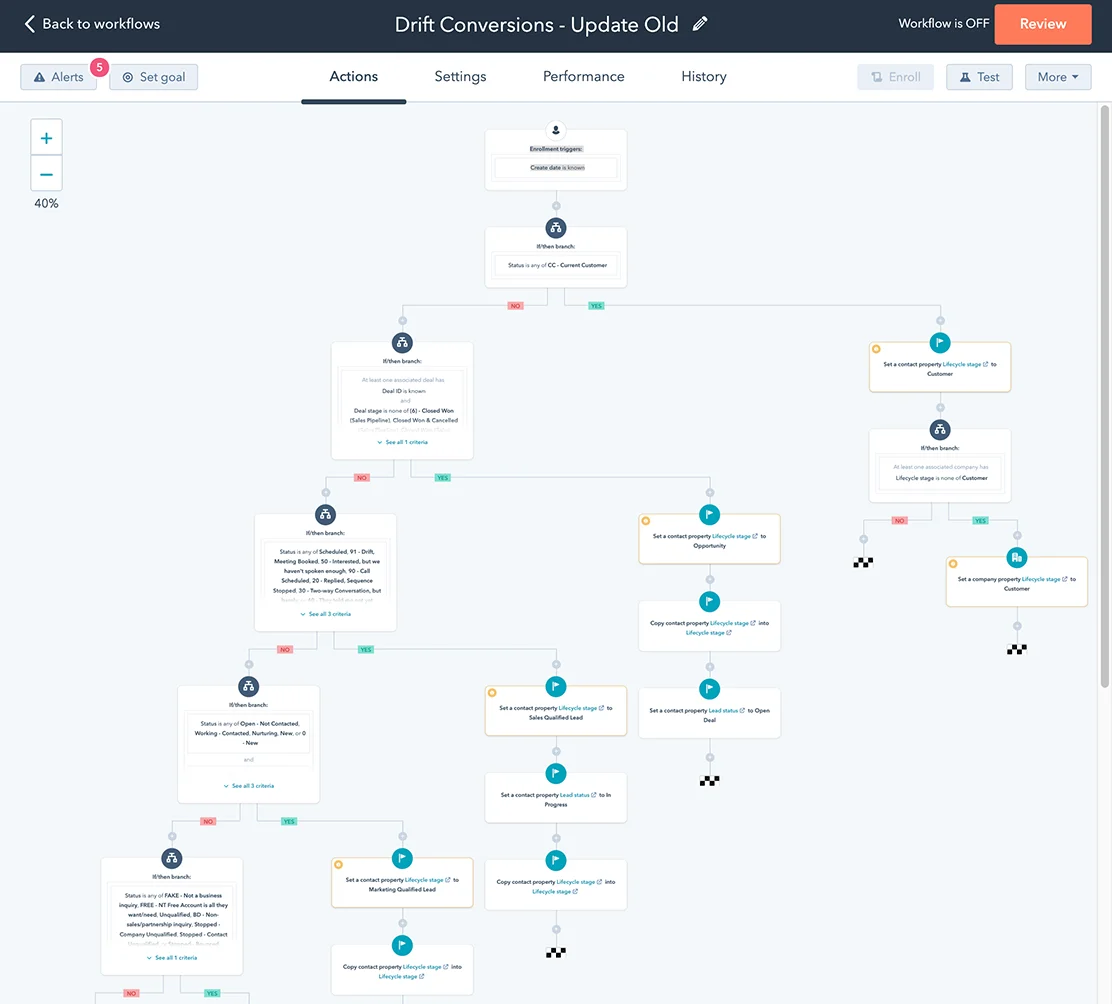
- Map out the workflow steps, including conditions, actions, and triggers, using HubSpot's workflow editor.
- Set up enrollment triggers to ensure that contacts enter the workflow based on specific criteria.
- Create branches within the workflow to personalize the customer journey based on different paths.
- Test the workflow thoroughly to ensure that it functions as intended before activating it.
Automated Actions Based on Customer Behavior
- Utilize HubSpot's workflow actions to automate tasks such as sending emails, updating contact properties, assigning tasks to team members, and more.
- Set up conditional logic to tailor actions based on customer interactions, preferences, or engagement levels.
- Monitor the performance of automated actions and make adjustments as needed to optimize the workflow for better results.
Segmenting Customers Effectively
- Use HubSpot workflows to segment customers based on predefined criteria like demographics, behavior, lifecycle stage, or engagement with your business.
- Create dynamic lists within workflows to automatically update customer segments as they meet specific conditions or criteria.
- Personalize marketing campaigns, content, and communications for different customer segments to enhance engagement and conversion rates.
Personalizing Customer Interactions
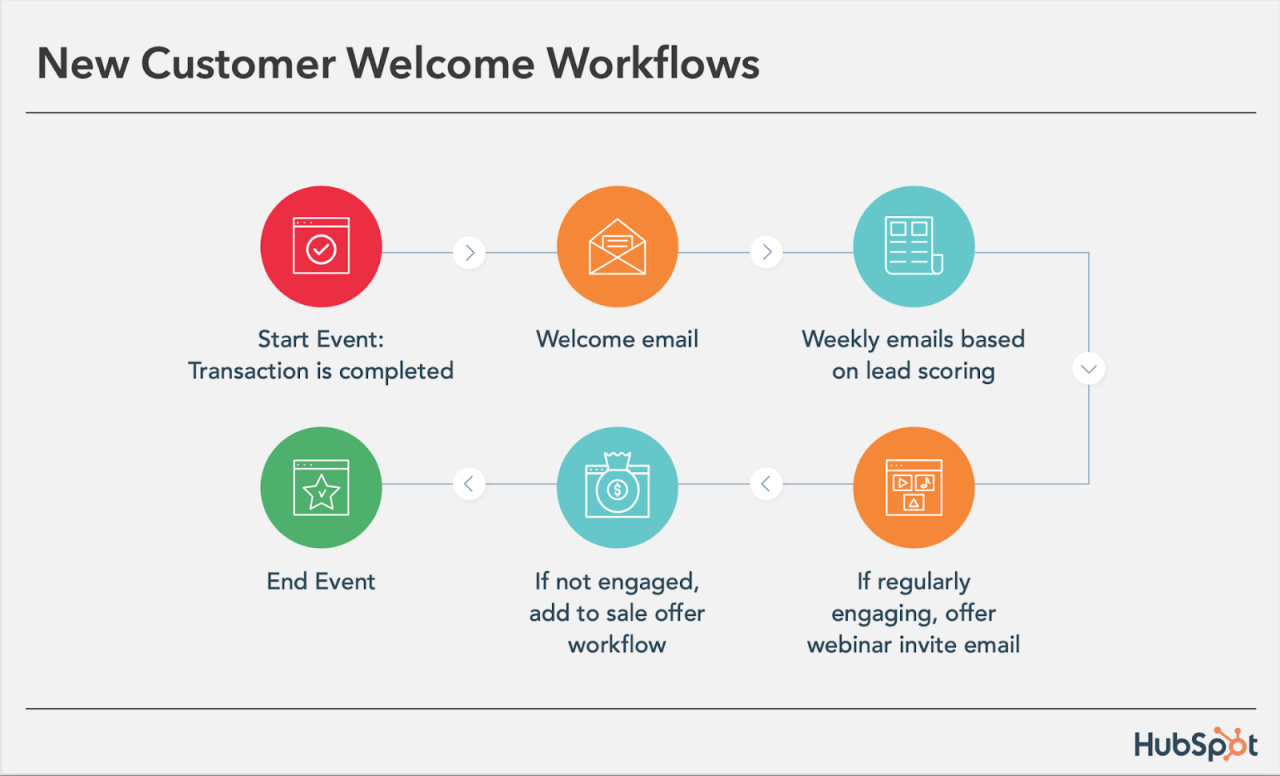 Personalizing customer interactions plays a crucial role in enhancing the overall customer experience. By creating tailored and relevant content, businesses can establish a deeper connection with their customers, leading to increased engagement and loyalty.
Role of Personalized Content
Customized content allows businesses to deliver messages that resonate with individual customers, addressing their specific needs and preferences. Personalization helps in creating a more personalized and unique experience for each customer, ultimately leading to higher customer satisfaction and retention rates.- Personalized greetings and recommendations based on customer preferences.
- Targeted promotions and offers based on past purchase history.
- Customized follow-up emails based on customer interactions with the website or products.
Using Custom Workflows for Targeted Messaging
Custom workflows in HubSpot enable businesses to automate the delivery of personalized messages to customers at the right time and through the right channels. By setting up specific triggers and actions, businesses can ensure that each customer receives relevant content that meets their needs and interests.- Segmenting customers based on demographics, behavior, or engagement levels.
- Creating personalized email sequences for different customer segments.
- Automating follow-up messages based on customer interactions with the website or emails.
Successful Personalization Strategies through HubSpot Workflows
Several businesses have successfully leveraged custom workflows in HubSpot to implement personalized strategies that drive customer engagement and satisfaction.- Netflix's recommendation engine uses personalized algorithms to suggest content based on viewing history.
- Amazon sends targeted product recommendations based on past purchases and browsing behavior.
- Spotify curates personalized playlists for users based on their music preferences and listening habits.
Enhancing Customer Engagement
Customer engagement is crucial for building lasting relationships and driving business growth. Customized workflows in HubSpot can be a powerful tool to enhance customer engagement by tailoring interactions to individual preferences and needs.
Utilizing Personalized Content
- Segment your audience based on their interests, behavior, and demographics to create personalized content that resonates with each group.
- Use dynamic content in your emails to deliver targeted messages that are relevant to each recipient, increasing engagement and response rates.
- Personalize your website content based on user interactions and preferences to provide a tailored experience that keeps customers engaged.
Nurturing Leads Effectively
- Set up automated workflows in HubSpot to nurture leads through personalized email sequences, providing valuable information and guiding them through the buyer's journey.
- Use lead scoring to identify the most engaged prospects and prioritize follow-up actions to maximize conversion opportunities.
- Create targeted workflows that trigger specific actions based on lead behavior, such as downloading a whitepaper or visiting a pricing page, to further personalize the customer journey.
Crafting Engaging Email Campaigns
- Design visually appealing email templates that align with your brand and capture the recipient's attention from the moment they open the email.
- Include personalized subject lines and content that speak directly to the recipient's needs and interests, increasing open rates and engagement.
- A/B test different elements of your email campaigns, such as CTAs, images, and messaging, to optimize performance and drive higher conversion rates.
Measuring Success with HubSpot Workflows
When it comes to custom HubSpot workflows, measuring success is crucial to ensuring that your efforts are driving positive outcomes for your customers. By identifying key metrics, analyzing data, and implementing best practices, you can continuously improve the effectiveness of your workflows and enhance the overall customer experience.
Identifying Key Metrics
Before you can measure the success of your custom workflows, it's important to first identify the key metrics that will help you track their effectiveness. Some key metrics to consider include:
- The conversion rate of leads nurtured through the workflow.
- The engagement rate of customers who have interacted with the workflow.
- The overall increase in customer satisfaction and loyalty.
Analyzing Data for Optimization
Once you have identified the key metrics, it's essential to analyze the data from your HubSpot workflows to optimize the customer experience. By closely monitoring performance indicators and customer behavior, you can gain valuable insights that will help you refine and improve your workflows. Some best practices for analyzing data include:
- Utilizing HubSpot's reporting tools to track and measure the performance of your workflows.
- Segmenting data to gain a deeper understanding of customer interactions and preferences.
- Identifying patterns and trends to make data-driven decisions for workflow optimization.
Best Practices for Continuous Improvement
Continuous improvement is key to maximizing the impact of your custom workflows on customer experience. By implementing best practices based on workflow performance, you can ensure that your efforts are aligned with customer needs and expectations. Some best practices for continuous improvement include:
- Regularly reviewing and analyzing workflow performance data to identify areas for optimization.
- Testing and iterating on workflow elements to enhance effectiveness and relevance.
- Soliciting feedback from customers to gather insights for further refinement of workflows.
Ultimate Conclusion
In conclusion, custom HubSpot workflows offer a powerful tool for businesses to elevate customer engagement, nurture leads, and drive conversions. By focusing on personalization and continuous improvement, companies can truly enhance the customer experience.
Popular Questions
How can HubSpot workflows benefit customer interactions?
HubSpot workflows enable businesses to automate actions based on customer behavior, leading to more personalized and targeted interactions.
What metrics should be tracked to measure the success of custom workflows?
Key metrics such as conversion rates, engagement levels, and lead nurturing effectiveness should be tracked to assess the impact of custom workflows.
Can HubSpot workflows be used to create engaging email campaigns?
Absolutely, HubSpot workflows can be utilized to design and execute engaging email campaigns that drive customer engagement and conversions.